Notification.Wpf
Cross-platform toast notifications library for .NET. Messages, progress bars, Builder API, DI support, lifecycle events.
Packages
| Package | Target | Description |
|---|---|---|
| Notification.Core | netstandard2.0 |
Platform-agnostic core: interfaces, Builder API, events, queue, DI |
| Notification.Wpf | net10/9/8/4.8-windows |
WPF implementation with full UI: toasts, progress bars, custom content |
| Notification.Console | netstandard2.0 |
Console implementation with colored terminal output |
| Notification.AvaloniaUI | net8.0 |
Avalonia UI implementation via WindowNotificationManager |
| Notification.Maui | net10.0-* |
.NET MAUI implementation via CommunityToolkit Snackbar |
Installation
// WPF (includes Core automatically)
Install-Package Notification.Wpf

// Or use Core directly for cross-platform
Install-Package Notification.CoreUI

// Platform-specific
Install-Package Notification.Console
Install-Package Notification.AvaloniaUI
Install-Package Notification.Maui
Quick Start — Builder API (cross-platform)
// Works on any platform via INotificationService
INotificationService service = provider.GetRequiredService<INotificationService>();

service.Show(NotificationBuilder
    .Create("Success", "Operation completed!")
    .AsSuccess()
    .ExpiresInSeconds(5)
    .WithPriority(NotificationPriority.High)
    .OnClick(() => Console.WriteLine("Clicked"))
    .Build());
Migrating from an earlier version?
Version 10.0 is fully backward compatible. Two legacy APIs are now [Obsolete] and have clearer
replacements — the Migration Guide covers them step by step:
// Progress: tuple API  ->  Report(...) overloads
progress.Report(50, "half done", "Working");

// ShowProgressBar: 16 positional parameters  ->  ProgressBarOptions
manager.ShowProgressBar(new ProgressBarOptions { Title = "Working...", ProgressColor = NotificationColor.LimeGreen });

// Show: up to 18 positional parameters  ->  NotificationBuilder (the old overloads still work)
manager.Show(NotificationBuilder.Create("Title", "Message").AsSuccess().ExpiresInSeconds(5).Build());
DI Registration
// WPF
services.AddWpfNotifications(config =>
{
    config.DefaultExpirationTime = TimeSpan.FromSeconds(5);
    config.MessagePosition = NotificationPosition.BottomRight;
});

// Console
services.AddConsoleNotifications();

// Avalonia
services.AddAvaloniaNotifications();

// MAUI (in MauiProgram.cs)
builder
    .UseMauiCommunityToolkit()    // required by Notification.Maui
    .UseMauiNotifications(config =>
    {
        config.DefaultExpirationTime = TimeSpan.FromSeconds(3);
    });
WPF — Classic API (backward compatible)
All existing WPF APIs continue to work without changes:
var notificationManager = new NotificationManager();

// Simple message
notificationManager.Show("Title", "Message", NotificationType.Success);

// Inside application window
notificationManager.Show("Title", "Message", NotificationType.Warning, "WindowArea");
Notification Types
None, Information, Success, Warning, Error, Notification
XAML — NotificationArea
xmlns:notifications="clr-namespace:Notification.Wpf.Controls;assembly=Notification.Wpf"

<notifications:NotificationArea x:Name="WindowArea" Position="TopLeft" MaxItems="3"/>
Progress Bar
using var progress = notificationManager.ShowProgressBar(new ProgressBarOptions
{
    Title            = "Processing...",
    ShowCancelButton = true,
});

for (var i = 0; i <= 100; i++)
{
    progress.Cancel.ThrowIfCancellationRequested();
    progress.Report(i, $"Step {i}", "With progress");   // tuple-free Report overload
    await Task.Delay(TimeSpan.FromSeconds(0.02), progress.Cancel).ConfigureAwait(false);
}
Lifecycle Events
INotificationEventService events = provider.GetRequiredService<INotificationEventService>();
events.NotificationShown += (s, e) => Log($"Shown: {e.Title}");
events.NotificationClicked += (s, e) => Log($"Clicked: {e.NotificationId}");
events.NotificationClosed += (s, e) => Log($"Closed: {e.Stage}");
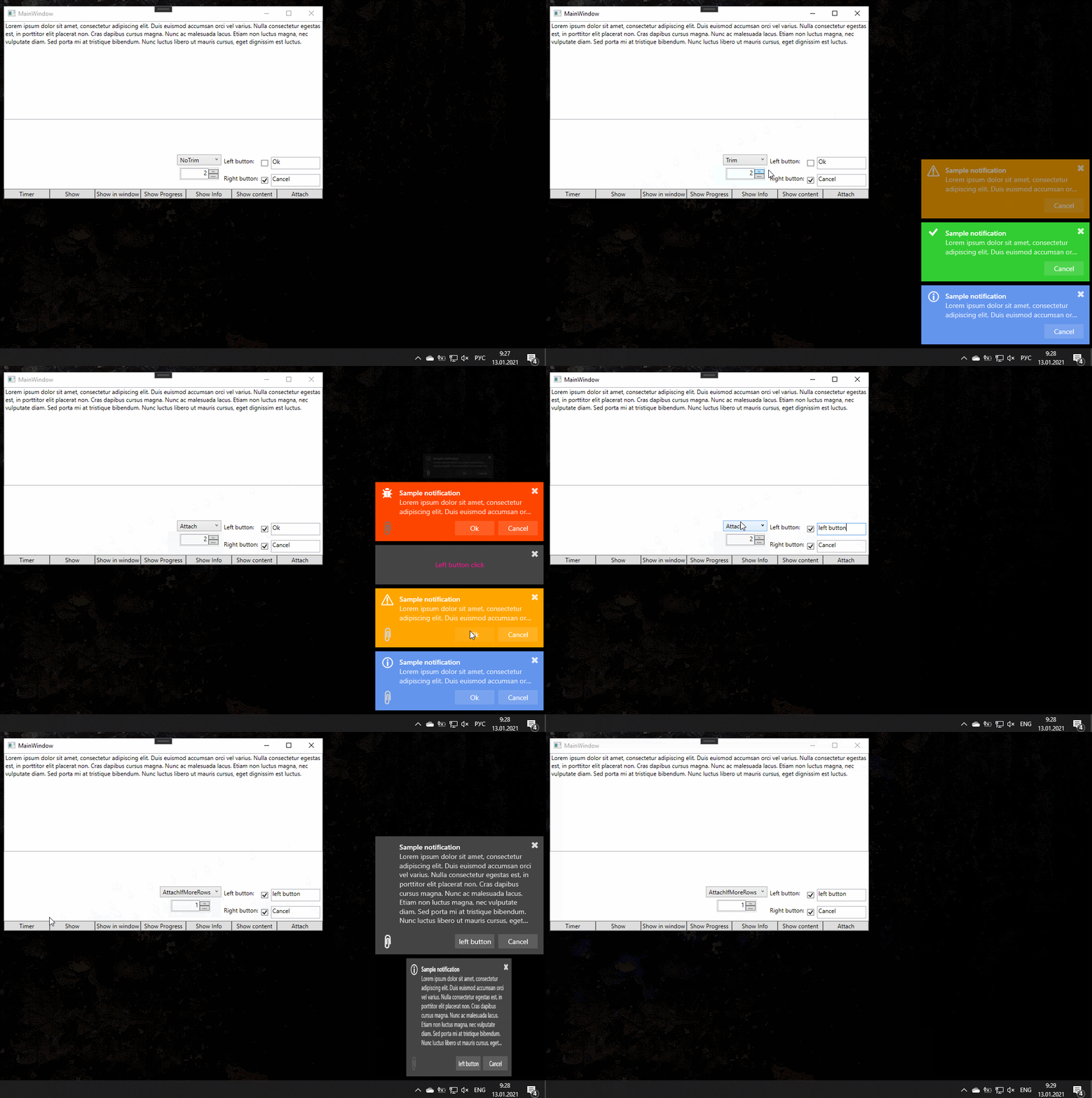
Demo


Known Issues
Notification window stays open after closing the app:
Application.Current.ShutdownMode = ShutdownMode.OnMainWindowClose;
Using in non-WPF hosts (WinForms, Console, VSTO, tests):
Since v9.0, Application.Current null-checks are built-in. The library works correctly when hosted in WinForms, console applications, Office add-ins, and other non-WPF processes without additional configuration.
MAUI on Windows — notification appearance:
On Windows, CommunityToolkit.Maui Snackbar uses native AppNotification (toast). The app name and icon shown in the notification center are determined by Windows app registration, not by the Snackbar API. SnackbarOptions colors are also ignored on Windows — the library uses emoji prefixes (✅ ⚠️ ❌ ℹ️) to visually distinguish notification types. Action buttons require Snackbar; notifications without buttons use Toast to avoid an empty button area.
Documentation
| Guide | Description |
|---|---|
| Getting Started | Installation, DI registration, first notification |
| Migration Guide | Upgrading: tuple progress, ShowProgressBar options, Builder API |
| Builder API | Fluent builder reference with all methods |
| Configuration | INotificationConfiguration and NotificationConstants |
| Lifecycle Events | Event tracking: Shown, Clicked, Closed, TimedOut, Dismissed |
| API Reference | Full API documentation (see navbar) |